Fazm vs ChatGPT Atlas
A voice-first AI agent for your entire desktop vs an AI-powered web browser. Two approaches to AI on macOS - here's how they compare.
Same prompt. Wildly different results.
We gave the exact same task to both: “Go to my Twitter, find great engineers in my space, and send them a personalized DM.”
ChatGPT Atlas
4 steps, follow-ups required, generic result
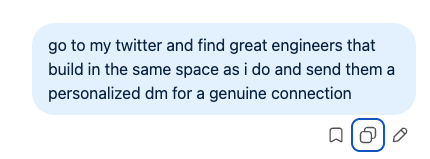

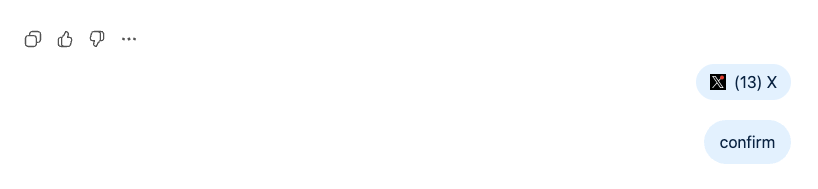
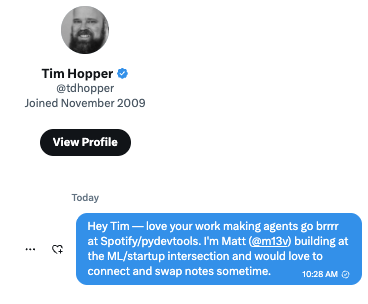
Generic. Slow. Frustrating.
Got blocked, asked for confirmations, sent a shallow DM with zero research. You could have done it faster yourself.
Fazm
1 prompt, zero follow-ups, deeply personalized
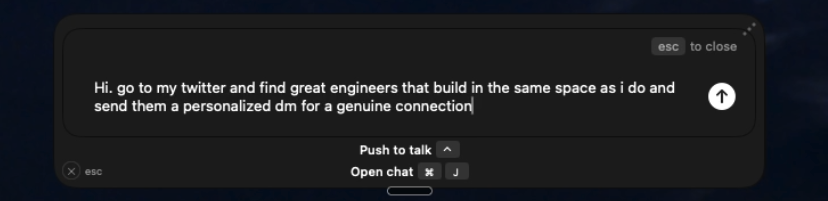
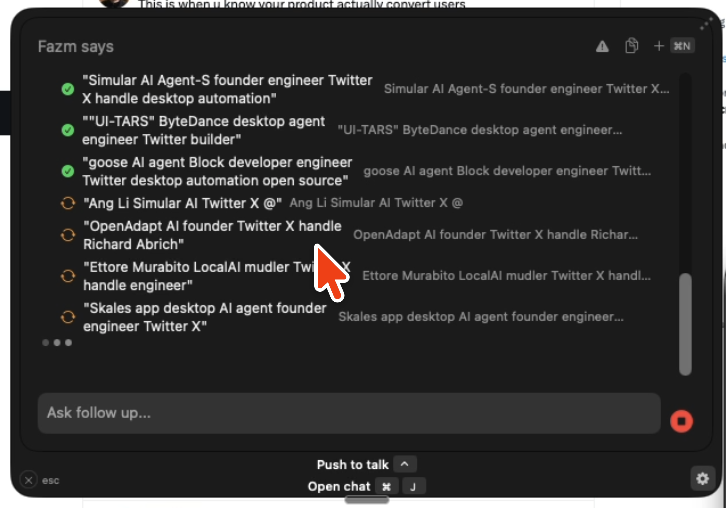
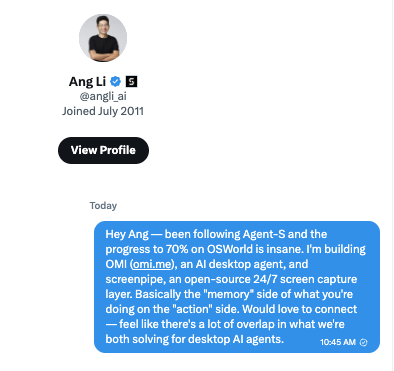
One prompt. Done.
Deep research, found the right people, personalized every DM referencing their actual projects. Zero interruptions.
You give Fazm a task and it just does it.
No follow-up questions. No confirmation dialogs. No “please enter your passcode.” One prompt, real results.
Full session recordings
Feature-by-feature comparison
How Fazm and ChatGPT Atlas stack up across every dimension.
Your entire desktop, not just a browser
Atlas lives inside a Chromium browser tab. Fazm operates across every app on your Mac - switch between VS Code, Figma, Slack, and Finder without leaving your workflow.
- Controls any macOS app
- Switches between applications
- Manages files and folders
- Types and clicks anywhere
- Limited to web pages
- Cannot access native apps
- No file system access
- Browser tab only
Speak naturally. Fazm acts instantly.
Fazm is built around voice - push-to-talk with one keyboard shortcut. Atlas requires you to type every instruction into a sidebar chat.
- Push-to-talk voice input
- Natural language commands
- One keyboard shortcut to activate
- Instant transcription
- Text-only sidebar chat
- No voice input
- Type every instruction
- No hands-free option
Sees your screen. Knows your files.
Fazm understands what's on your screen across all apps and indexes your local files to build persistent context. Atlas only sees the current browser tab.
- Full desktop context via accessibility API
- Local file indexing
- Persistent knowledge graph
- Cross-app context
- Current tab only
- No file access
- Session-only memory
- No cross-app awareness
Your data stays on your machine.
Fazm processes screen data locally before sending only the intent to AI models. Atlas sends full page content to OpenAI's servers for analysis.
- Local screen processing
- Only intent sent to AI
- Open source & auditable
- No data collection
- Pages sent to OpenAI
- Proprietary processing
- Closed source
- OpenAI data policies apply
About each product
ChatGPT Atlas
by OpenAI
A Chromium-based web browser with ChatGPT built in. Launched October 2025 for macOS. Features a sidebar assistant that summarizes pages, answers questions, and rewrites text. Plus subscribers ($20/mo) get agent mode - now powered by GPT-5.4 (March 2026) with native computer use capabilities. In February 2026, OpenAI merged Operator into ChatGPT as “ChatGPT agent,” combining web browsing and deep research into one unified agent. GPT-5.4 scores 75% on OSWorld - but still runs in a cloud VM, not on your actual desktop.
Fazm
Open source
An AI computer agent for macOS that goes beyond the browser. Controls your mouse, keyboard, browser DOM, and native apps - all triggered by voice. Indexes local files, builds a knowledge graph, and integrates with Google Workspace. Screen analysis runs locally for privacy. The entire project is open source.
GPT-5.4 computer use vs Fazm's approach
OpenAI's GPT-5.4 launched with native computer use capabilities, scoring 75% on OSWorld - surpassing the 72.4% human baseline. But how it controls your computer matters just as much as how well it scores.
GPT-5.4 CUA
Cloud VM + screenshots
- Runs in a cloud VM - not your actual machine
- Takes screenshots, sends them to OpenAI for analysis
- 75% OSWorld via screenshot-only observations
- ChatGPT agent merges Operator + deep research
- Cannot access local files, native apps, or desktop
- Latency from cloud round-trips on every action
Fazm
Local accessibility API
- Runs on your Mac - controls your actual desktop
- Uses macOS accessibility API for precise, fast actions
- Sees screen + reads accessibility tree (not just pixels)
- Zero cloud round-trips for mouse and keyboard actions
- Full access to local files, native apps, and OS features
- Screen analysis processed locally before hitting any API
GPT-5.4's benchmark scores are impressive, but its computer use runs in a sandboxed cloud VM - it sees screenshots, not your desktop. Fazm runs locally, uses the accessibility API for sub-second actions, and never sends your screen to a remote server. Same goal, fundamentally different architecture.
When to use which
Choose Fazm if you...
- Work across multiple desktop apps, not just a browser
- Want voice-first control over your computer
- Need your AI to understand local files and context
- Prefer open source software you can inspect
- Want screen analysis that runs locally for privacy
Choose Atlas if you...
- Primarily work inside a web browser
- Want GPT-5.4's ChatGPT agent for web tasks
- Already pay for ChatGPT Plus
- Don't need desktop-wide automation or voice
Ready to try the faster approach?
Download Fazm for macOS and see what a desktop-wide AI agent can do. Free and open source.
Other comparisons
Fazm vs Claude Cowork
AI Desktop Agent vs Sandboxed VM
Fazm vs Highlight AI
AI Agent vs AI Observer
Fazm vs Perplexity Comet
AI Desktop Agent vs AI Browser
Fazm vs Perplexity Personal Computer
AI Desktop Agent vs Cloud Mac Mini
Fazm vs Simular AI
AI Desktop Agent vs Screenshot Agent
Fazm vs Apple Intelligence
AI Desktop Agent vs Built-in AI
Fazm vs OpenAI Operator
AI Desktop Agent vs Cloud Browser Agent
Fazm vs Google Project Mariner
AI Desktop Agent vs Chrome Extension
Fazm vs Manus AI
AI Desktop Agent vs Cloud Agent
Fazm vs UiPath
AI Desktop Agent vs Enterprise RPA
Fazm vs Claude Computer Use
AI Desktop Agent vs Developer API
Fazm vs Microsoft Power Automate
AI Desktop Agent vs Enterprise Automation
Fazm vs Zapier AI
AI Desktop Agent vs Workflow Platform
Fazm vs Adept AI
AI Desktop Agent vs Enterprise CUA
Fazm vs Rabbit R1
AI Desktop Agent vs Hardware Device
Fazm vs MultiOn
AI Desktop Agent vs Browser Extension